![logo_lg-1.png]](https://knowledge.netexplorer.fr/hs-fs/hubfs/logo_lg-1.png?height=40&name=logo_lg-1.png)
Set up automatic purging of deleted users on your platform
When a user is permanently deleted from your platform (permanently deleted, not simply deactivated), some information is retained in order to maintain the audit trail for the documents they owned.
If you want these users removed entirely from Voltn's databases, you can enable automatic purging of deleted accounts.
To do so, open your platform's Administration, then Configuration > Security.
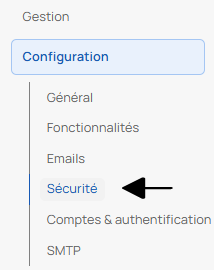
Open the Compliance pane, then enable the automatic purge of deleted accounts.

Once this setting is enabled, any deleted user will also be erased from our databases.
Please note: this applies to users who have been permanently deleted, not to accounts that have simply been deactivated.